template: bright_generic_report
bright_generic_report
The bright generic report template can be used to render a Bright StoredQuery into a sortable data view widget.
name
This is the name of the stored query in Bright.
DataTables version
You can now specify a field like
[bright datatables={attr}] # where attr is one of modern,classic, or yadcf
Note, for yadcf, some filters have changed.
- number-range should be range_number or range_number_slider
- dates should be date or range_date
There is also an autocomplete filter.
query_scope
A Bright builtin query will need a query_scope of bright. Otherwise, this parameter can be left blank.
pagesize
Set the initial pagesize with pagesize attribute. Default is 25.
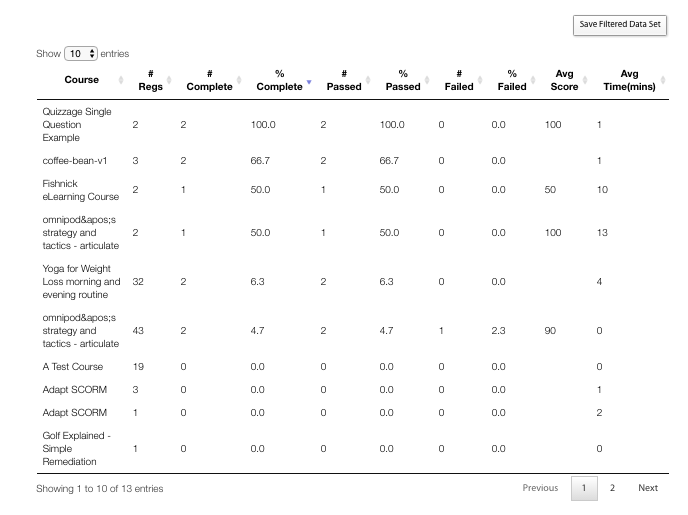
[bright class=none type=generic template=bright_generic_report name=brightCourseSummaryReport pagesize=10 query_scope=bright fields=10 headers=Course,# Regs,# Complete,% Complete,# Passed,% Passed,# Failed,% Failed,Avg Score, Avg Time(mins)/]
fields
The number of fields expected back from the Bright API.
headers
A comma separated list of headers to render on the top of the sortable table.
Filters
A comma separated list of filter types. For example:
filters=select,text,select,select,number-range,select,date-range
where each filter is one of:
- a select box
- a text entry box
- a numerical range
- a date range
Data Available To The Bright Query
All attributes to the Bright shortcode are passed to the Bright server. The following are added:
- host_url - full URL of requesting page.
- hosturl - just the site name, no protocol
- first_name - first name of current user. Can be overridden with shortcode attribute \'first_name\'.
- last_name - last name of current user. Can be overridden with shortcode attribute \'last_name\'.
To add your own query parameter, just add an attribute to the shortcode:
[bright thisfield=will shop up in the query parameters sent to bright and=that is too easy/]
Using Data From the URL Query Parameters
To add data to your query, use the use_query_parameters attribute the bright shortcode. So, for example, if the URL has the course guid in it, use a shortcode like:
[bright class=none type=generic template=bright_generic_report name=non_learners pagesize=10 fields=6 headers=email,first_name,last_name,state,manager filters=text,text,text,select,select use_query_parameters=course_guid/]
Anything that is in the use_query_parameters attribute will be extracted from the page URL and passed to the stored query specified.
Using User Specific Profile Data
And field that is listed in the bright settings under UserMeta Sync will be available to the back-end query. For example, if you list:
first_name,last_name,group_name
The backend query will see the following parameters:
- usermeta_first_name
- usermeta_last_name
- usermeta_group_name
Debugging
Add the
[ dump='t']attribute to the shortcode to dump the template context to the page.
Changing the Table Class
You can change the table class from the default of 'bright-generic-datatable', which can allow different jQuery datatables code to be run.
[bright template="bright-generic-report" tableclass="my-datatable"]Then from javascript
jQuery(document).ready( function () {
  jQuery('table.my-datatable').DataTable(
    {
      dom: 'Bfrtip',
      buttons: [
        'csv'
      ]
    }
  );
} );
Screenshot
[bright class=none type=generic template=bright_generic_report name=brightCourseSummaryReport pagesize=10 query_scope=bright fields=10 headers=Course,# Regs,# Complete,% Complete,# Passed,% Passed,# Failed,% Failed,Avg Score, Avg Time(mins)/]
Common CSS Tweaks
Here\'s some frequent post-render tweaks:
<script>
Bright.addHook('after_load',function() {
  setTimeout(function () {
    jQuery('div.bright-results-matrix').css('overflow-x','scroll');
    jQuery('.form-control').css('border','none');
  });
});
</script>
Chrome/Flash Considerations
Note, in modern versions of Chrome, you must explicitly grant Flash access to your site. Ask no longer really works.
Related Posts: