template: invitation_results_matrix

Overview

Allows a reporting matrix to be embedded for a particular invitation.

Location

bright-template-pack

Example Usage

 [bright class=none type=generic template=invitation_results_matrix invitation_name=Untitled Invitation 2013-07-11 10:18:45/]

For license key reporting

The same report can be used for license key reporting, using the license key name:

 [bright class=none type=generic template=invitation_results_matrix invitation_name=MyLicenseKey/]

Setting Invitation Via URL:

 https://mywebsite/invition_page?invitation_name=[my invitation key].

This overrides [and makes unnecessary] the use of shortcode attribute above.

NOTE - class must be set to none.

Screen Shot

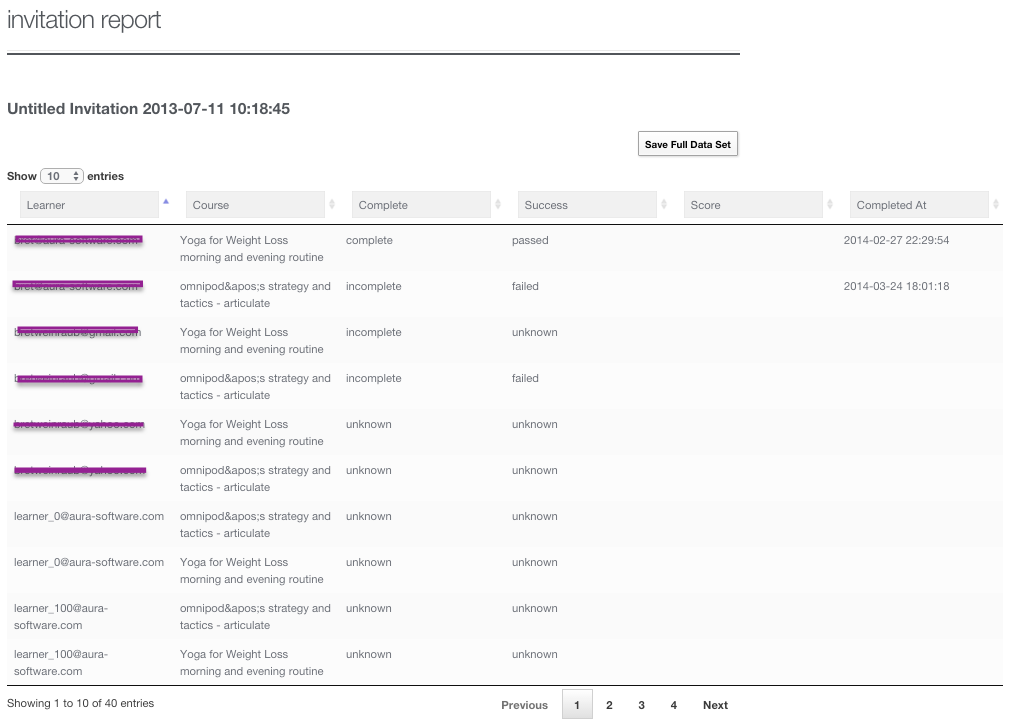
[![Screenshot](http://help.aura-software.com/wp-content/uploads/sites/3/2015/10/invitation-results-matrix.png)][1](http://help.aura-software.com/wp-content/uploads/sites/3/2015/10/invitation-results-matrix.png) Screenshot of the invitation results matrix, an interactive grid viewer displaying results related to a Bright registration and/or license key.

Adding Reporting Users

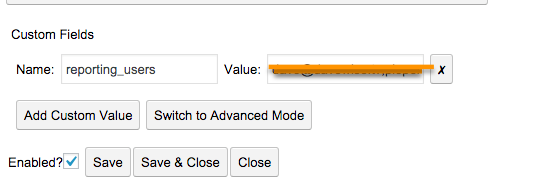
Use the Embedded Administration Tool to add a custom field on the invitation called reporting_users:

2016-12-08_1510

Note the format is a comma separated list, no spaces, no quotes.

You can also create a Role on your WordPress site called reporter, and grant that role to a user. They can then view this report for any license key.

See Also

Bright Shortcode Reference