Technical Details Related to Bright Authentication Tokens and WebStack Integrations Like WordPress
About This Document
While Bright is most often used on WordPress it can also be integrated via its API easily on any Web Stack.
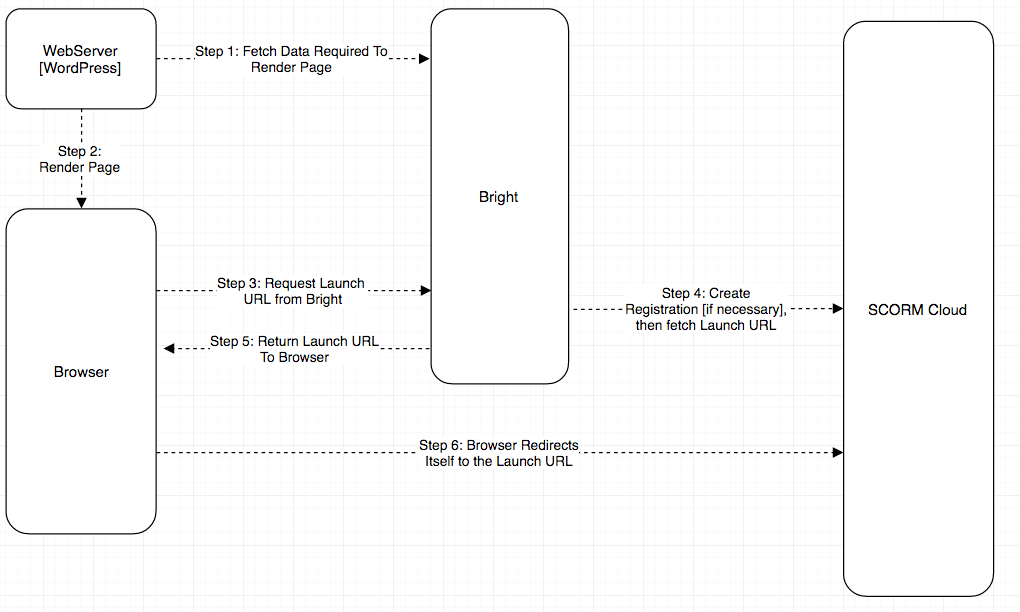
This document covers the minimum requirements to launch courses from any web pages outside of WordPress. It also illustrates some implementation details that are also true of the Bright Platform for WordPress Plugin
Bright requires that the bright.js script be loaded to the page, with some minimal reference informatio provided to the web stack.
Typically, this looks like this:
Identifying the Learner
The webstack receives the HTTP requests from the browser, and part of those are the cookies associated with the user's session. This means the webstack knows who is accessing the page [or is it an anonymous user?].
Since Bright functionality is exposed to the end page via bright.js, our javascript library requires the webstack obtain an API key from the Bright API, and stuff it into the page. This can be a simple meta tag like:
Then just take the access token out of the response, place it into a meta tag, load the bright.js through normal script tags, and you should be good to go.
Token Expiration Rationale
The API Key gives the user access to certain Bright API calls, for a limited duration. If someone highjacked your session [via MITM attack or otherwise], the amount of havoc they could wreak is limited by the token expiration time. If you put the token expiration time into the page, bright.js can do some intelligent things with that information but it\'s not critical. For example
Including all the fields above will mean that the page won't have to fetch this data from the Bright API when bright.js initializes.
Caching
Current webstack implementations for Bright, like WordPress and Drupal, cache the API key along with the expiration date and return the cached key to the page if it hasn't expired. This can save time and improve page performance.
What happens if the Bright Token expires
Expiration of the Bright token can happen if the user leaves the page up for a long time. In this case consider the scenario where a user launches a course, but the token has expired. The user is no longer authenticated for this action. In this case, the bright.js script handles this case and will trigger the page to refresh.
If a course launched in a popup, an expiring Bright token doesn't impact course recording, since the Bright token is not part of the SCORM data interchange that occurs between the course and SCORM Cloud.
Ultimately it nearly every case refreshing the token is completely transparent to the user and is very reliable.