Bright Documentation
  • Contact Us!
  • Glossary
  • About Bright
  • PHP API Docs
  • Web Services API
Chat History
Bright Documentation > Bright For WordPress > Invitations > Setting Start and End Dates on Invitations

Setting Start and End Dates on Invitations

For the moment, this works only with the Bright Classic Template

Need it to work somewhere else? Just Contact Use.

Related Posts:
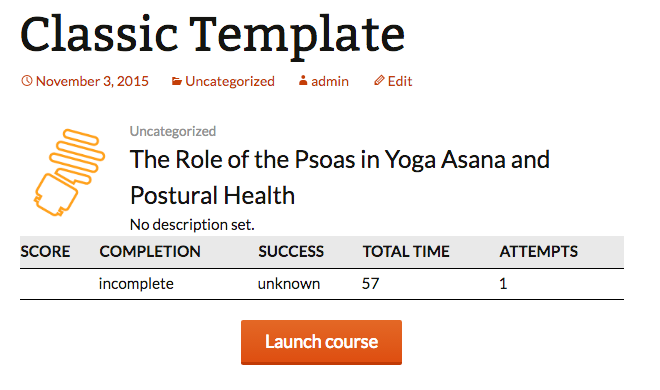
  • classic
    template: classic
    Builtin Templates
  • learning-path
    template: bright-learning-path
    Builtin Templates
  • 2016-10-11_1001
    Adding A Bright Template to a WordPress Page or Post
    Bright For WordPress
  • changetitle
    template: certificate
    Builtin Templates
  • Creating a Named Template
    Creating a Named Template
    Bright For WordPress
  • Square-Brackets,-Curly-Brackets,-Angle-Brackets,-Oh-My-1_720x370
    Bright Template Reference
    Bright Shortcodes

Documentation

  • Aura Code/GitLab
    • GitLab Issue Tracker Quick Start
    • Creating New Issues Via Email
    • GitLab Rationale
  • Bright For WordPress
    • Bright E-Learning Dashboard
    • Bright Shortcodes
      • Builtin Reports
        • report: brightLearningPathSummaryReport
        • report: brightCourseSummaryReport
      • Builtin Templates
        • template: invitation_results_matrix
        • template: bright_results_matrix
        • template: bright-course-usage-bubbles
        • template: classic
        • template: certificate
        • template: bright-course-table
        • template: bright-learning-path
        • template: bright_generic_report
        • template: bright_ui_course_select
        • template: bright-learning-path-certificate
        • Skipping Automatic Registration GUID lookup and de-duplicating logic in Bright Course Launchers
      • Bright Template Reference
      • Debugging Bright Embedder Templates
      • Setting the Course ID for a Template
      • Bright Shortcode Reference
      • Restricting Content To An Administrator
      • Styling A Generated Template
      • Customizing Certificate Images
      • Displaying a Language Specific Course
      • shortcode: [bright_learning_path_status]
      • Changing a Course Title
    • Bright WooCommerce Integration
      • License Keys
        • Setting License Seat Quantity using Bright Metadata
        • License Key Integration with WooCommerce Checkout
        • Enabling Users to Add Bright License Keys
        • Adding License Key Data to WooCommerce Order Received Page
        • Re-generating a License Key
        • template: license-key-widget
        • Bright WooCommerce Integrations Actions And Filters
        • Creating Custom License Key Logic
        • Considerations for Permalinks and License Key URLs
        • Settings To Control License Key Creation
        • License Key Registration
      • Installation
      • Linking A Product
      • Criteria of Order Completion
      • Setting License Seat Quantity using Bright Metadata
      • BrightWoocommerceIntegration API Documentation
      • Bright for WooCommerce Implementation Notes
      • WooCommerce Integration Templates
      • Linking A Course Based on Variable Product Data
      • Understanding The Checkout Process
      • Styling the Bright License Key Checkbox
      • Bright WooCommerce Integration Hooks
      • Manually Changing the name of a Bright License Key
      • Granting Course Registration on Purchase To Dynamic Courses
      • Disabling the Requirement for a Shipping Address in WooCommerce Checkout
      • Using Simplified Checkout
      • WooCommerce Troubleshooting
      • WooCommerce Integration Worksheet
      • Show All Purchased Courses
      • Configuring How A Course Product Appears To A Purchaser
      • Understanding the “My Courses” Account Page
      • template: bright_woocommerce_purchased_products
      • Bright WooCommerce Integrations Actions And Filters
      • Changing Order Completed Email Text
      • Bright is unable to process simple orders made via Guest Checkout.
      • Bright Isn’t Processing My WooCommerce Orders
      • 422 Error In Bright Manage Order Hook – WooCommerce Checkout
      • Multi-License Orders
    • Configuration
      • Configuring The Bright Plugin
      • template: bright_woocommerce_purchased_products
    • Invitations
      • Setting Start and End Dates on Invitations
      • Creating A License Key Using The Invitations Interface
    • LearnDash
      • LearnDash Integration Setup
      • LearnDash Integration Concept Guide
    • Finding your Course ID
    • Managing User Profile Data Syncing to Bright Server
    • Installation of the Bright Plugin
    • Debugging Bright For WordPress
    • Internationalization (i18n)
    • Extracting A Registration ID from A Bright Template
    • Bright WordPress Hooks and Filters Reference
    • Accessing User Profile Data From a Bright Template
    • Protected: LP Issue
    • Altering a Generated Template After It Renders
    • Adding A Bright Template to a WordPress Page or Post
    • Controlling Bright Initialization and Creation of API Keys
    • How to Access SCORMCloud Reportage Straight From Bright
    • Anonymization Of Learner Registration Data
    • Creating a Named Template
    • How Do I Get Started With Bright
    • Troubleshooting Bright
    • Course GUID
    • Setting Up Bright Sync
    • Configuring Anonymous Access
    • PHP Client Calls to the Bright API Quick Start
    • Bright E-Learning Dashboard Hooks And Filters
    • Changing a Course Title
    • Using Bright Before It Has Initialized
    • Controlling Landscape Printing For Certificates
    • Clearing Your Browser Cache
  • Bright Server
    • Bright Server Console
      • Realm Editor
        • Using the Realm Editor
      • Reporting
        • report: Registration Summary
        • General Report Controls
        • report: Registration Detail
        • report: Response Summary
      • Getting Registered and Logged In
      • Registration Explorer
      • Course Explorer
      • Finding the SCORMCloud XAPI Registration ID
      • Initiating the Course Crawler
    • Bright API Documentation
    • Manually Repairing Bright Registration Data
    • Receiving Notifications of Course Completion
    • Using Course Properties To Change How Completion and Success Are Determined
    • Bright API Performance
    • Course/Registration Structure
  • bright.js
    • Hooking into the Bright Javascript Lifecycle
    • Browser Health Checking
    • Viewing Bright Cache Data
  • Embeddable Admin Console
    • The Bright Admin Tool
    • Creating An Invitation Via The Embeddable Admin Console
    • Editing Course Metadata
    • Troubleshooting The Embeddable Admin Console
    • Editing Invitations from the Embeddable Admin Console
    • Managing License Seats via The Embedded Admin Console
  • Overview
    • Bright Platform Summary
  • Q&A
    • How can I register a user to a WooCommerce site that did not checkout?
    • How can I have a user take a course a second time?
    • How can I define a Bright Javascript Helper to run only on a single page?
    • Why doesn’t my uploaded course appear in Bright?
    • Why can’t I view my course library in SCORM Cloud?
    • Why is my data missing in SCORM Cloud Reportage?
    • Why do I get a template error of “TypeError: Cannot read property ‘attributes’ of null”
    • The Bright Plugin is generating a “cannot resolve host: bright.aura-software.com” error
    • Php dies with Uncaught Error: Call to undefined function Bright\\mb_encode_numericentity()
    • Why don’t I get a “Download to Excel” Link
    • Why doesn’t the data in SCORMCloud match what is recorded in Bright?
    • Understanding the Bright E-Commerce Architecture
    • How available is the Bright Web Service?
    • Why Use the Bright API?
    • How to we change or modify the message “Please login or register to view this content.”
    • How do we replace the WordPress logo on login or registration pages
    • Why is email from my WordPress site going to spam.
    • How can we create an order on behalf of a customer without actually funding it?
    • I have a user who wants to change an email address?
    • Finding The Order for any old SCORM Cloud Registration
    • How can I impersonate a user in WordPress
    • Why Do I See A Course Duplicate Times in the My Courses Page
    • Managing Course Content with External Linking
    • How do I publish [or republish] a course?
    • How do I modify a course to a purchased license key
    • Why Can’t I See My Bright Template in the Bright Edit Templates Screen
    • How To Keep Responsive CSS From Hiding Elements of the Stats Table
    • Bright is unable to process simple orders made via Guest Checkout.
    • Why Doesn’t My License Key Field Show Up In Checkout?
    • Bright Isn’t Processing My WooCommerce Orders
    • Resolving Course ID Not Found Problem in MyCourses
    • 422 Error In Bright Manage Order Hook – WooCommerce Checkout
  • SCORM, xAPI, and Scorm Cloud
    • Finding your Course ID
    • How to view SCORM Cloud Launch History
    • Why doesn’t my uploaded course appear in Bright?
    • Why is my data missing in SCORM Cloud Reportage?
    • Finding Your SCORMCloud App ID and Secret Key
    • Using SCORM Cloud without the popup window
    • SCORM Engine Package Properties
    • How to Access SCORMCloud Reportage Straight From Bright
    • Resetting SCORM Cloud registration activity
    • Importing And Testing Content In SCORM Cloud
    • SCORMĀ® 2004 3rd Edition Run-Time Environment (RTE) Version 1.0
    • SCORM Cloud Course Properties
    • Important Information About SCORM Cloud Tagging
    • Launching a SCORM Cloud course full screen
    • Solving Issues Where Captivate Does Not Set Success
  • Uncategorized
  • Web Services API
    • Fetching Bright Statistics
    • Full API Documentation
    • Using Course Custom Data in an API Request
    • Rewriting Query Parameters to the Bright API
    • Minimum Requirements for a Bright Integration
    • How available is the Bright Web Service?
    • Why Use the Bright API?
    • PHP Client Calls to the Bright API Quick Start
© 2026 Bright Documentation
Get Bright